Jumper, before you download: what works and what could cost you
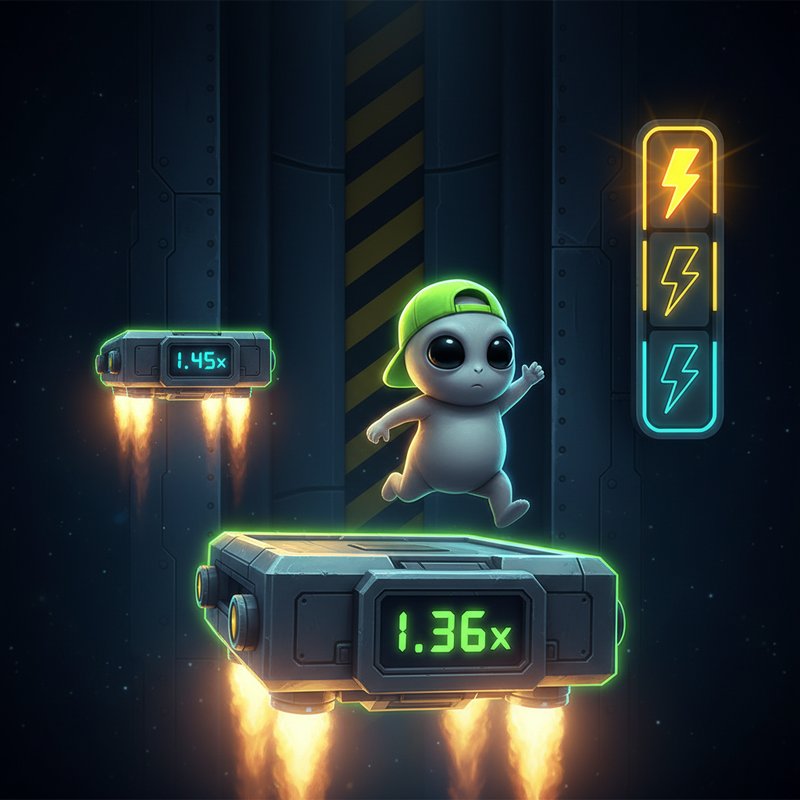
There is no single official Jumper download that can be confirmed from the game information supplied. Jumper is presented as a slot game by InOut Games, but no verified Google Play or App Store listing, package name or operator-specific app has been provided. Claims that a generic APK is the official app should therefore be treated cautiously.
The safest route is a UKGC-licensed operator. Check the UKGC public register and match the licence number shown in the footer. In the United Kingdom, real-money online casino play is legal only through an appropriately licensed operator. Even then, an app may be a web app, a browser game or an operator-built wrapper rather than a standalone download from a public app store.
The app-style game card, with the missing details left blank
A store page normally provides technical and commercial metadata before installation. The source information for Jumper does not include a confirmed public store listing, so figures such as ratings, download totals, file size, version number and update date must not be presented as verified facts. The card below records what is known and where operator or store details remain variable.
What the game should look like across five screens
Before entering any funds, compare the operator’s game with the documented Jumper interface. A genuine build should present the same core decisions and maths, although colours, navigation and promotional screens may differ between operators.
- Main game screen: a cute grey alien stands on a metal platform inside a dark, riveted spacecraft. The active platform displays its multiplier in acid green, while upcoming platforms remain cyan. The character’s position is the primary way to identify the active platform.
- Decision screen: GO and CASHOUT should both be available during a round. Every successful jump raises the multiplier from 1.01x upwards, while cashing out collects the amount shown at that moment.
- Difficulty screen: Easy offers 40 platforms and a maximum of 62x; Medium offers 38 platforms and up to 8,500x; Hard offers 35 platforms and up to 190,000x. These are different risk profiles, not different payment methods.
- Free Games screen: collecting three yellow lightning symbols triggers the bonus, or eligible players may purchase direct entry. The alien climbs automatically to the maximum safe platform across 3–10 randomised spins, depending on difficulty, and the multipliers accumulate.
- Verification screen: the Provably Fair Settings dialog should allow players to copy the client seed and SHA-256 server-seed hash. A published hash before a round and the revealed seed afterwards should correspond for independent checking.
The visual sequence also changes by difficulty. Easy uses the green cap, Medium adds aviator goggles and a gold chain, and Hard uses a white astronaut suit with a jetpack. Win celebrations can include orange-red Super Win or purple Mega Win screens. Such details help check the build, but they cannot replace licence verification.
Four installation routes, each with a different risk
- Browser route: open the game through a UKGC-licensed operator, select Jumper and allow the page to load in your mobile browser. There is no APK to install and no app-store permission request. Risk: unknown links may imitate the operator, so type or bookmark the verified address rather than following an unsolicited message.
- Add to Home Screen route: use the browser’s add-to-home-screen option, then open the saved shortcut. This creates a launcher icon that may behave like an app while remaining dependent on the browser. Risk: it will not usually provide the same independent update controls or visibility of stored web data as a native app.
- Operator app route: if the licensed operator publishes its own app through Google Play or the App Store, download it from that store and locate Jumper inside the operator’s game lobby. Risk: a listing can still be impersonated, so confirm the developer name, store details and operator licence before signing in.
- APK route: an Android package offered outside Google Play should be avoided unless the operator explicitly requires it and provides a verifiable source. Risk: an APK may contain unwanted access to files, notifications, camera, microphone or accessibility controls. Unknown packages may also replace the game or capture account and payment details.
No permissions are automatically red flags in isolation, but unexpected permissions are. A slot should not need unrestricted file access, contact-list reading, microphone recording, camera access, accessibility control or device-admin privileges to work. Review every permission and reject optional requests that are unrelated to play.
Phone requirements and what this app actually does
Jumper is designed for mobile portrait and landscape use and supports touch controls with a minimum target size of 44×44 pixels. The supplied information does not specify minimum Android or iOS versions, device storage, processor or RAM. Use a current browser or an operating system still supported by its security updates, keep enough free space and allow the operator to refresh the game when needed.
- The browser game is the core product: choose a difficulty, place a permitted stake and use GO to climb or CASHOUT to collect the displayed amount.
- Free Games mode follows three lightning symbols or an eligible direct purchase. The bonus price and purchase availability may vary by operator, so check the current terms before paying.
- The game displays balance, stake and potential win in real time. It also provides keyboard navigation, screen-reader support and a colour-blind-safe interface.
- A packaged app may add launcher access, notifications or operator account features, but it does not make the game less volatile. Native installation is not evidence of fairness or financial protection.
Use a compatible phone rather than trying to bypass device or account restrictions. Keep the operating system, browser and official operator app updated. Close the game when the connection becomes unstable, because an interrupted round can affect how a result is recorded.
Where players lose money, and how to limit the damage
The central risk is not a hidden download charge but the decision to climb. A low multiplier can look safe, yet one fall can remove the round’s progress. Loss sequences are normal in a high-volatility game, and a previous near-win does not improve the next round. The potential 190,000x multiplier is not an expected return and should not be treated as a savings plan.
- Set a deposit limit before playing. UK slot stakes are capped at £5 per spin for most adults and £2 for players aged 18–24. Operators must offer deposit limits, and affordability checks can begin from £150 in net deposits per month.
- Use smaller, repeatable stakes instead of increasing them to recover a loss. Never borrow to play, and do not treat gambling winnings as income.
- Choose a cashout target before starting. Leaving the game after a pre-set profit or loss makes the session less reactive and reduces the temptation to chase a bigger multiplier.
- Check wagering conditions before accepting any promotion. A wagering requirement is always present where promotional funds are offered, and the rules differ between operators. Do not treat a displayed bonus balance as withdrawable cash.
- Allow time for age and identity checks before depositing. Documents may be required before the first withdrawal, with 24–48 hours being a common processing period. Keep payment details in your own name; credit cards have been banned for gambling in the United Kingdom since 2020.
- Withdraw winnings you choose to keep rather than recycling them automatically. Payment methods and withdrawal times vary, while gambling winnings are tax-free for the player.
Write the amounts as £10.00, including any budget shown in your notes, and use BeGambleAware if gambling is becoming difficult to control. A licensed operator cannot make losses disappear: set limits, take regular breaks and stop when the session no longer feels controlled. If a clone uses a near-identical name, requests unusual permissions, promises a guaranteed return or asks for payment outside the verified operator, leave it and report it.
FAQ
Is there an official Jumper APK?
The supplied game information does not identify a verified official APK, package name or public app-store listing. Use Jumper through a UKGC-licensed operator’s browser or verified app. Treat any independently offered APK as unsafe unless the operator publishes and explains it.
Does downloading the app make Jumper safer?
No. An app icon does not prove that an operator is licensed, that the maths are fair or that a player is protected. Verify the operator in the UKGC public register, match the licence number in the footer and check the app publisher before granting permissions.
Can I play Jumper without depositing?
Demo play is common on licensed UK gambling sites, although some operators show free play only to logged-in, age-verified accounts. A demo can demonstrate the interface without staking money, but it cannot reduce the financial risk of real-money play.
How do I know that a Jumper clone is fake?
Warning signs include a different developer name, an unverified licence, misspelled store details, guaranteed-win claims, requests for banking passwords, unexpected permissions or payment requests outside the operator. Compare the core interface, check the footer licence and leave if any details do not match.